Business Network Installation for Startups: Build It Right the First Time
Startups are famous for moving fast, improvising, and making do with whatever gets them to the next milestone. That mindset works for product experiments and early sales motion. It does not work well for your network.
I have seen young companies spend heavily on laptops, SaaS subscriptions, and office design, then treat the underlying network like an afterthought. A consumer router gets dropped into a utility closet. Someone buys a cheap switch online. Wi Fi covers half the floor. Conference calls freeze, file transfers crawl, printers disappear, and the team loses trust in the environment. By the time headcount doubles, everyone is paying for those early shortcuts.
A proper business network installation is not glamorous, but it is one of the few office investments that pays off every single day. When done correctly, it supports collaboration, security, voice, access control, cameras, cloud tools, and the simple expectation that people can sit down and work. The goal is not to overspend. The goal is to build a network that fits where the company is headed, not just where it is this week.
For startups, the smartest approach is usually a balanced one: install the physical backbone properly, size the electronics for near-term growth, and leave enough room to expand without tearing walls open later.
The part startups often underestimate
When founders hear "network," they often think about internet speed. That is only one piece of the puzzle. A stable office network depends on the full chain: incoming service, firewall, switching, wireless design, network cabling, patch panels, equipment racks, labeling, and power protection. If one part is weak, the entire system feels unreliable.
The physical layer deserves special attention. Structured cabling is the part you least want to redo after move-in. A startup can replace switches in an afternoon. It cannot easily re-pull cable above finished ceilings, around glass office fronts, or through occupied work areas without disruption and cost. That is why office network cabling should be planned with more care than the average startup gives it.
I once worked with a fast-growing software company that moved into a polished new space with exposed ceilings and a clean industrial look. To save money, the landlord’s contractor ran the minimum number of data drops and left almost no spare capacity. Twelve months later the company added a support pod, two huddle rooms, and badge access on a side entrance. Suddenly every change required visible surface raceway and after-hours patchwork. The aesthetic they cared about on day one ended up costing them more on day three hundred.
Start with the headcount you expect, not the headcount you have
If your startup has 18 employees today and expects 40 within a year, design for 40. If you are signing a three to five year lease, think even further ahead. Network capacity is not just about desk count. It includes wireless access points, VoIP phones if you use them, conference room systems, printers, cameras, door controllers, and spare ports for the unknown device someone will need six months from now.
A practical planning baseline is to estimate at least two network connections per workstation area in many modern offices, even if one remains unused at first. That gives flexibility for docking stations, IP phones, secondary devices, or future reassignment. Conference rooms nearly always need more than expected. A room with one display and one table can quickly turn into a room with a video bar, control panel, wireless presentation device, dedicated PC, and occupancy sensor.
This is where data cabling planning becomes a real business decision. Pulling one extra cable during initial construction is cheap. Pulling one later is not.
Why structured cabling matters more than fancy hardware
People love to compare firewall brands and access point specs. Those choices matter, but they sit on top of the permanent infrastructure. Structured cabling gives order to what otherwise becomes a mess of ad hoc lines, mystery ports, and unlabeled patch cords.
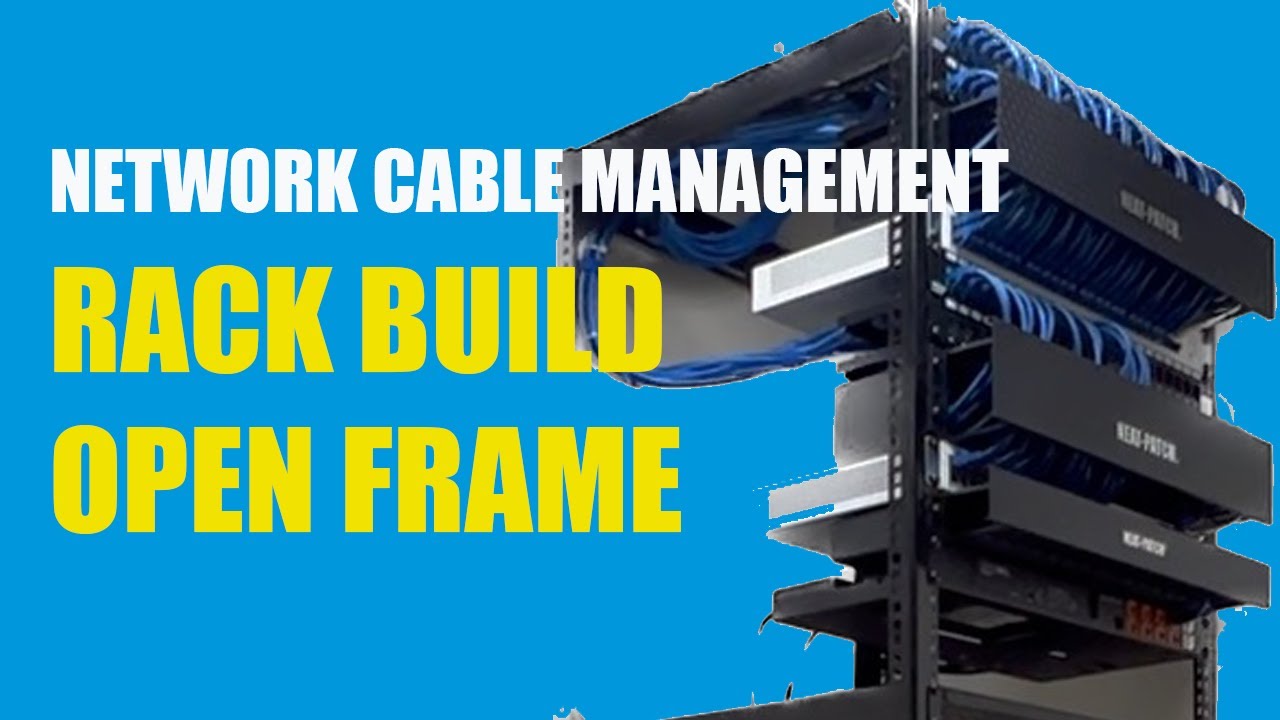
Done well, structured cabling means each cable run terminates cleanly, is tested, labeled, documented, and tied back to a patch panel in a known location. That matters during outages. It matters when a new employee joins. It matters when your managed service provider asks what port serves the conference room on the east side. If no one knows, you waste time tracing cables that should have been documented from the start.

A good cabling layout also supports cleaner segmentation. If you want separate networks for staff, guests, cameras, and building systems, disciplined cabling and patching make that easy. If everything lands in a pile of unmanaged gear, every future change becomes riskier.
The phrase "low voltage cabling" often gets used broadly here, and that is fair. In a startup office, low voltage cabling may include your ethernet cabling, Wi Fi access point runs, security cameras, access control readers, intercoms, and AV connections. These systems often overlap in the same ceiling spaces and pathways. Coordinating them early prevents congestion, interference, and ugly rerouting later.
CAT6 or CAT6A, and when the upgrade is worth it
This is one of the most common startup questions, and the honest answer is that both can be right.
CAT6 cabling is a solid choice for many offices. It supports gigabit networking easily and can support higher speeds over shorter distances depending on the environment and the quality of installation. For a typical startup suite with moderate run lengths and standard workstation needs, CAT6 cabling is often cost-effective and entirely sufficient.
CAT6A cabling costs more in both materials and labor. The cable is thicker, less forgiving in tight spaces, and sometimes requires more attention to fill ratios and pathway management. But CAT6A cabling supports 10 gigabit performance to full channel distance under the standard, which can matter if you want stronger future-proofing, higher uplink capacity, or cleaner support for demanding applications over time.
The decision usually comes down to a few factors: office size, expected lifespan of the space, budget tolerance, and whether you foresee heavier bandwidth demands. If you are building out a headquarters-style office you expect to keep for years, CAT6A often makes sense for the horizontal runs, especially if labor to reopen paths later would be painful. If you are taking a smaller swing space with a short lease, CAT6 may be the smarter use of capital.
One hybrid approach works well in practice. Use CAT6A cabling for backbone links, server room interconnects, and high-priority areas such as conference spaces or creative teams, while using CAT6 cabling for standard desk drops. That is not always necessary, but it can be a rational compromise when budget is tight.
The hidden cost of poor network cabling installation
Bad network cabling installation rarely fails in a dramatic way on day one. More often, it creates a background level of instability that chips away at productivity.
A few examples come up again and again. Cables are pulled too tightly and performance degrades. Bend radius gets ignored above a ceiling turn. Terminations are sloppy. Patch panels are crammed into a shallow wall bracket with no service loop. Access point cables are left several feet away from the actual mounting point, forcing awkward extensions. Labels exist on one end but not the other. Nothing is tested beyond "it links up."
Those shortcuts are expensive because they hide until the office is busy. Once the team is fully operating, troubleshooting becomes disruptive. If a camera drops offline, a meeting room fails during a client call, or a floor area starts reporting intermittent connectivity, the savings from the cheap installer disappear quickly.
This is why choosing a contractor who genuinely understands business network installation matters. You want someone who asks about rack layout, pathways, patch panel capacity, AP placement, PoE loads, and testing standards, not just someone who quotes a price per cable drop and moves on.
Wireless is not a substitute for cabling
Startups often assume that strong Wi Fi can reduce their need for ethernet cabling. It can reduce some desk dependence, but it cannot replace a properly wired office.
Wireless access points need cable runs. So do phones in some environments, conference room systems, printers, and security devices. Even in flexible offices where most employees work over Wi Fi, the network still relies on robust switching and properly placed wired uplinks. If anything, a wireless-first office demands better cabling discipline because access point placement becomes critical.
I have seen offices with expensive enterprise Wi Fi gear perform poorly because access points were installed where cable runs happened to be convenient, not where coverage and capacity required them. One AP over a reception desk and another buried in a corner office will not serve an open plan effectively, no matter how good the brand name is.
Wireless design should account for density, wall materials, glass partitions, ceiling height, and likely collaboration zones. Startups often experience their heaviest wireless demand in areas they underestimate: near conference rooms, kitchen seating, engineering pods, and all-hands spaces.
The network closet deserves real thought
You do not need a full data center, but you do need a proper home for your network. This area is often called the MDF, IDF, telecom room, or simply the network closet. Whatever the name, it should not be an afterthought shared with janitorial supplies, water heaters, and random storage.
The ideal room has dedicated power, cooling or at least predictable ventilation, secure access, enough wall and rack space for growth, and pathways that do not force ugly cable routing. If your startup plans to use PoE heavily for access points, cameras, and phones, heat can become a real concern. I have walked into closets where the switch stack was running hot simply because the room had no airflow https://datadesign742.capitaljays.com/posts/office-network-cabling-for-moves-adds-and-changes and the door stayed shut all day. Electronics survive that for a while, then they do not.
A clean rack build pays for itself in maintenance. Patch panels at the top, switches arranged logically, cable management in place, circuits labeled, UPS sized appropriately, and spare rack units left open for expansion. It does not have to look extravagant. It just needs to be intentional.
Security begins at layer one
Cybersecurity discussions usually focus on software, identity, and endpoint protection. Fair enough. But physical network design still matters.
Unsecured switch locations, unlabeled ports in public areas, and undocumented patching can create easy opportunities for mistakes or misuse. Guest Wi Fi should be segmented from internal systems. Security cameras and door access systems should not be treated as an afterthought bolted onto the same flat network as employee laptops. Even if your startup is small, separate VLANs and clean documentation make future security policy much easier to implement.
There is also a practical incident-response angle. When a problem hits, a documented cable plant and port map shorten the time to isolate affected devices. That is not theoretical. It matters when an office camera stops recording, a conference room appliance starts behaving oddly, or you need to identify what is actually plugged into a mystery port after a move.
Budget smart, not cheap
A startup should absolutely watch costs. It just needs to know where frugality helps and where it backfires.
The best place to spend is the permanent infrastructure: pathways, rack layout, patch panels, labeling, and high-quality data cabling. Those are expensive to correct later. The best place to stay flexible is active equipment that can be swapped as needs evolve. Switching platforms, firewall subscriptions, and access point models change much faster than the cable in your walls and ceilings.
It also helps to budget for spare capacity from the start. Not extravagantly, just enough. A patch panel filled to 100 percent on opening day is a warning sign. The same is true of a switch stack with no open ports and a rack with no room left for growth. Startups change too quickly for zero headroom.
Here is a sensible framework for evaluating proposals:
- Prioritize the physical cabling plant and installation quality over cosmetic savings.
- Include extra drops and spare rack capacity where future additions are likely.
- Match switch power and port counts to expected PoE devices, not just current desks.
- Require testing, labeling, and as-built documentation before sign-off.
- Compare total lifecycle cost, not just the lowest install number.
That last point matters more than many founders expect. A proposal that is 10 to 15 percent cheaper up front can be far more expensive once move-add-change work begins.
Questions worth asking your installer
If you are hiring a cabling or IT infrastructure contractor, the right questions will tell you a lot about how they work. You are not just buying cable pulls. You are buying judgment.
Ask how they label and document every run. Ask whether certification testing is included and what format the results come in. Ask how they coordinate network cabling with access points, cameras, and AV systems. Ask what they recommend for CAT6 versus CAT6A in your exact space, not in the abstract. Ask how much spare capacity they typically build into patch panels, pathways, and racks.
Listen for specific answers. Good installers talk in details. They mention run lengths, ceiling conditions, IDF placement, firestopping, rack elevations, and termination standards. Vague answers usually predict vague execution.
New office, shared office, or warehouse loft, the environment changes the design
Not all startup spaces are created equal. A polished new office in a class A building allows for one kind of cabling strategy. A converted warehouse or older building creates very different constraints.
Older buildings may have limited pathway space, odd wall construction, unknown penetrations, or electrical noise concerns in mixed-use areas. Shared office suites can introduce restrictions on core drilling, after-hours work, and landlord approvals. Exposed ceiling designs look great but reveal every routing mistake. Warehouses and light industrial spaces may require more robust protection for low voltage cabling, especially where lifts, storage, or open rafters are involved.
This is why site walks matter. Real design decisions happen when someone physically examines ceiling space, riser access, closet options, and where people will actually sit and work. A startup that signs a lease before understanding those conditions can get surprised by installation cost.
Do not forget moves, adds, and changes
A startup office is almost never static. Teams reshuffle. Pods grow. Sales wants another huddle room. Engineering takes over part of the open area. One desk bank becomes a podcast corner, then a recruiting bullpen.
Good office network cabling anticipates that churn. Extra drops in strategic zones, clearly labeled patch panels, and a little spare switching capacity make changes manageable. Without that flexibility, every headcount shift turns into a mini construction project.
This is where documentation quietly saves the day. A current floor plan with port labels, switch mappings, and wireless access point locations can cut troubleshooting and change time dramatically. Most teams ignore documentation until they need it urgently, which is the worst possible time to discover it does not exist.
A practical startup build strategy
If I were advising a startup moving into its first real office, I would push for a straightforward approach that avoids both overbuilding and underbuilding.
Pull solid horizontal cabling to every likely workstation zone, conference room, reception area, and shared space. Plan wireless access point locations based on coverage needs, not convenience. Build a small but proper network closet with room to grow. Choose switching that supports your PoE and segmentation needs. Label everything. Test everything. Keep the records.
If budget pressure is severe, reduce scope in ways that do not damage the foundation. Maybe you delay a second switch until needed. Maybe you choose CAT6 instead of CAT6A where appropriate. Maybe you leave some drops unterminated but pulled and documented for future use. Those are reasonable compromises. Skipping structured cabling discipline altogether is not.
Here is the short checklist I would use before approving the job:
- Every planned seat, room, and device area has enough present and future connectivity.
- The cable type fits the lease term, performance goals, and budget reality.
- The network closet has power, ventilation, security, and expansion room.
- Wireless access points, cameras, and other PoE devices are included in the design.
- Testing results, labels, and as-built documentation are part of final delivery.
What building it right actually looks like
When a startup gets this right, the office feels boring in the best sense. Calls work. Video meetings start on time. New hires plug in and connect immediately. Guest Wi Fi stays separate. Conference rooms behave predictably. Cameras record. Badge readers stay online. When something does need attention, the team can identify the problem quickly because the network was built with order.
That kind of reliability creates more value than many leaders realize. It removes friction from hiring, onboarding, support, sales demos, and day-to-day collaboration. It also protects the company from the compound cost of rework. Every avoided outage, after-hours cable pull, emergency contractor visit, and productivity dip adds up.
For startups, speed matters. So does getting the foundation right. A thoughtful business network installation gives you both. It lets the company move quickly without constantly tripping over the infrastructure beneath it. And when growth finally arrives faster than expected, as every founder hopes it will, your network will be one of the few things already ready for it.
Fontana Tech Pros provides professional network cabling installation, structured cabling, fiber optic installation, commercial WiFi, access control, security camera installation, alarm systems, and phone system solutions for businesses throughout Southern California. Learn more at https://fontanatechpros.com/.
Fontana Tech Pros specializes in reliable network cabling solutions for commercial offices, warehouses, schools, and industrial facilities. Our experienced team delivers high-quality structured cabling and low-voltage installations designed for long-term performance.